
Audit Trail
Helix keeps a live audit trail beside the live data: every change to a business document — a resource, a project, a desk, a hub, a surge zone — is recorded as it happens, with who made it, when, and what the values were before. The trail is part of the operational record, not an afterthought: it answers “who moved this job’s window?”, “when did this crew get assigned?”, and “what did this record say yesterday?” from inside the app, via the Audit button on each editor.
What an entry holds
Section titled “What an entry holds”Each entry records the prior value of every tracked field the change touched — old values
only. The display derives the “new” side of each line from the entry that follows it (or from the
live record, for the most recent change), so a row always reads field: old → new without the
trail ever storing a value twice. Fields set for the first time are listed as added; a deleted
record’s entry carries the whole document as it stood.
- Who — the signed-in user who made the change, by name. Changes Helix makes on its own behalf are attributed to System (scheduled events, scenario drivers) or Spiral (the optimiser’s own re-planning), so nothing in the trail is anonymous.
- When — entries are ordered reliably even when several land in the same second.
- What — in principle every business field is tracked. A small exclusion set keeps the noise out: version counters, internal bookkeeping, and the optimiser’s continuous travel-time re-estimates, which would otherwise drown the story. A stop’s arrival time is recorded exactly when it is worth reading — alongside another substantive change, or when the plan resequences around it.
One action, one transaction
Section titled “One action, one transaction”When an operator’s edit causes the optimiser to re-plan, the edit and its consequences are one transaction: the entry holds the field changes and the schedule effects that flowed from them — grouped per affected document. Rebook a stop’s window and the project’s audit shows your edit together with the stops the optimiser moved in response, under your name, at one moment. A re-plan that touches another document (a crew pulled off one job to cover another) writes one entry on that document too, so every record’s history stays complete in its own right.
Where things were — the trail on the map
Section titled “Where things were — the trail on the map”Some of the record is a place, not a value, so the audit can show it on a map. Every editor’s Audit button opens the trail as a panel down the right; a Map toggle there hands the map’s own space to a temporary view of the audit, drawn on a real map canvas (the live map is set aside and restored untouched when you close it). For a resource it plots the AVL trail — the positions it moved through, oldest to newest, its latest at the end. For a project it plots the job’s stops and the journeys between them. It opens framed on the thing you are looking at — a resource’s current position, a project’s origin — sized to show the whole audit, and is yours to pan and zoom from there. Anything the audit recorded that has no resolvable position is counted in a footer rather than silently dropped.
Because a location’s coordinates are rarely what you want to read, they stay off the written
lines — a move shows on the map, and a change to the address or area beside it shows as a line in
the panel; the raw latitude and longitude are a hover away. Timestamps throughout are the short
dd/MM HH:mm form, and the trail begins at the point the plan is first built — the initial world
load is setup, not history.
Stops live inside their document’s history
Section titled “Stops live inside their document’s history”Stops are not audited as separate records. A stop’s changes — created, reassigned, its window moved, its state advancing, completed — are entries of the resource or project that owns it, with the stop identified inside the entry (by its durable position in the plan, not a session-scoped id). A project’s audit is therefore the full story of the job: the record’s edits and its stops’ lifecycle, interleaved in time, from one query.
A resource’s audit is its own record’s changes — including sign-on, going off duty and standby, which show as ordinary state changes — plus the stops in its plan: when a job the resource is working changes state, that transition is noted on the resource too, so a crew’s trail reads as what it actually did. Two deliberate quietings keep that legible: a resource’s own roster stops (the shift scaffolding) contribute only their location, not their internal churn; and a stop merely being shuffled between resources while still in planning is not an event — the assignment records once the work is real. The new state of a stop shows on the entry’s own line, so a transition reads at a glance without a row of its own.
In your vocabulary
Section titled “In your vocabulary”The audit display speaks the same client language as
the rest of Helix: entity names come from your domain’s helix.vocabulary table, and any field
label can be renamed the same way ("earliest": "Earliest arrival") with no code change. Action
completions recorded against a stop appear in the owning document’s trail with the action’s text
and outcome.
Retention and archiving
Section titled “Retention and archiving”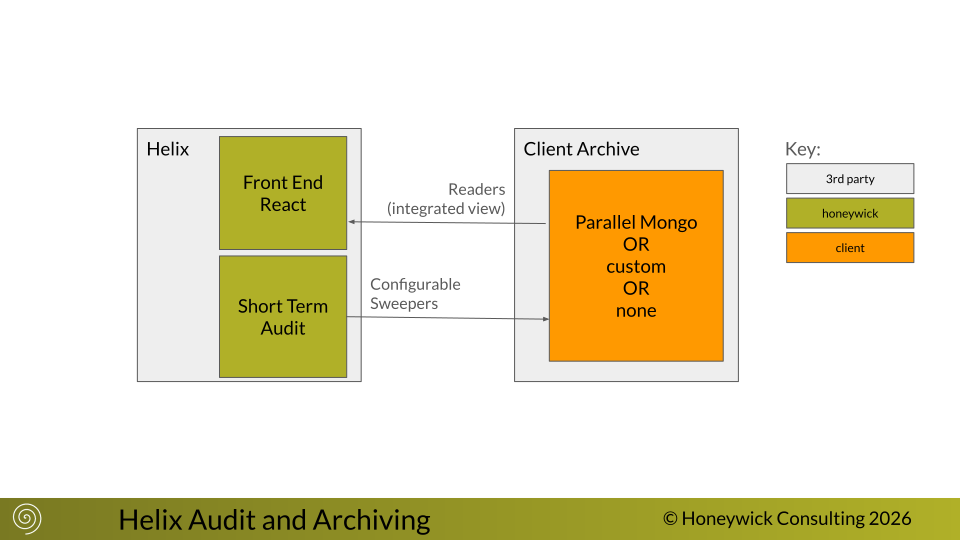
The live trail is the recent window; the archive is the durable record behind it. Helix keeps the live audit and live data small — enough for the operator’s working view — and an archive sweep moves completed work and older history out to a backing store, keeping both Helix and the optimiser to live work.
- When an entity completes — a job whose stops are all done, once a short grace has passed and nothing is still owed on it — its record and its full trail (including the closing entry) are written to the archive and then removed from the live store. The removal is a real deletion, so the optimiser stops carrying finished work too.
- While an entity is still live — a resource on shift, say — only its older audit is drained: a resource’s trail is never split across a shift, so history is archived up to an off-duty point, never mid-shift.
- The backing store is your choice. By default Helix writes to a parallel database alongside the live one (its name from the environment), which you can query directly. A client can instead supply its own archive function — to write the customer’s own MongoDB/Atlas, or a legacy format behind a bespoke accessor — or send a record type to neither (accepted and discarded).
The mechanism is reliable by design: writes are idempotent and the live copy is deleted only after the archive write succeeds, so an interruption never loses a record and never leaves a half-archived one. Archiving is off until you configure it — a deployment with no archive settings keeps everything live — and it never runs during a simulated scenario, so demonstrations show history building up untouched.
The trail’s own display shows the most recent entries per record; reaching further back — a resource’s previous shifts, an archived job — is the archive read side, rendering archived data alongside the live window. (The read accessors and the resource date-search are in progress.)