
Actions
An action is a flag raised against a stop that asks an operator to look at it and make a decision. The system raises the flag, an operator processes it in the context of the job, and the outcome is recorded and audited. Actions are how you put a human checkpoint into an otherwise automatic plan — most usefully, to stop the wrong resource being sent, especially where the cost to serve is high.
(For the screen itself see the Introduction; for how domain configuration fits together see the Helix technical overview.)
Processes, steps and actions
Section titled “Processes, steps and actions”The organising idea is the process — a composed piece of operational behaviour such as the standby callout, a rebooking, or keeping a customer informed. A process is made of members of two kinds:
- a step is a member the system concludes — a notification send and its retries, a roster rewrite, a timeout firing, a boundary force;
- an action is a member a person concludes — the subset of the work that needs human judgement.
The pool of what needs doing at any moment is the outstanding steps and actions of the live processes. Two rules bind the kinds together. A step that fails becomes an action: when a notification channel exhausts its retries, the process raises a dispatcher action — the manual workaround is built into the process, never bolted on. And the split is a dial, not a design: the same process definition can run a member as an action for one client and a step for another — an ETA update can be a “call the customer” action or an automated message, without redesigning the process.
The built-in processes are catalogued in builtInProcesses. The standby callout is the reference implementation: a trigger step (Spiral raises the call), notify steps (channels ring, retry), an action (accept/refuse), an answer-window step that concludes the action as a refusal if nobody answers in time, and a roster-rewrite step on acceptance.
Why actions exist
Section titled “Why actions exist”Spiral optimises the whole operation against your model of cost. Most of the time the plan it builds is the one you want. But the lowest modelled cost is not always the right answer:
- a long deadhead to reach a job when a nearer resource was almost as good,
- a premium or scarce resource committed to routine work,
- a plan that technically satisfies a contract but breaches its spirit,
- a high-value job about to be served by a resource you would rather hold back.
You cannot economically encode every one of these as a hard constraint — and you would not want to, because the right call often needs a human. An action lets you encode the trigger — “raise a flag when the plan looks like this” — and leave the decision to a controller. The plan keeps moving; the flag waits for a person where a person adds value.
The five themes
Section titled “The five themes”Actions earn their place through improved quality and productivity. The pre-built actions, and the ones you author, group under five themes:
- Demand reduction — take work out of the plan before a wheel turns: validate entitlement to service at the point of contact, and remote fix — running the Diagnostic Tree with the customer so a visit is avoided entirely. An avoided visit is the cheapest job you will ever serve.
- Demand smoothing — move work to an easier-to-serve time: a rule spots hard-to-serve bookings (cost or lateness signals) and raises an offer rebooking action; the accepted offer is applied through the rebook machinery.
- Project verification — review and improve the project definition before it is served: opening
and closing times confirmed (the pre-built
confirmDestination), parts availability checked, access constraints captured. These are indoor actions: while the engineer works the previous stop, an indoor operator verifies the next one — the productivity gain is leveraging that time so the field is never where a definition gap is discovered. - Additional resourcing — bring capacity in when the plan needs it: the built-in standby callout,
an authorise overtime checkpoint, or the pre-built
outsourceaction handing work to a third party. All three follow the callout’s shape. - Customer management — keep the customer informed and confirm the proposed plan will lead to a
successful outcome: the pre-built
etaCallback(“call the customer with a revised ETA”), or its automated twin over the notification channels — the action/step dial again.
How operators use actions
Section titled “How operators use actions”Pending actions appear in the Actions list in the dispatch screen’s left column. They are ordered with the hottest first — by urgency, then by the stop’s arrival time, latest first — so the most pressing checks sit at the top.
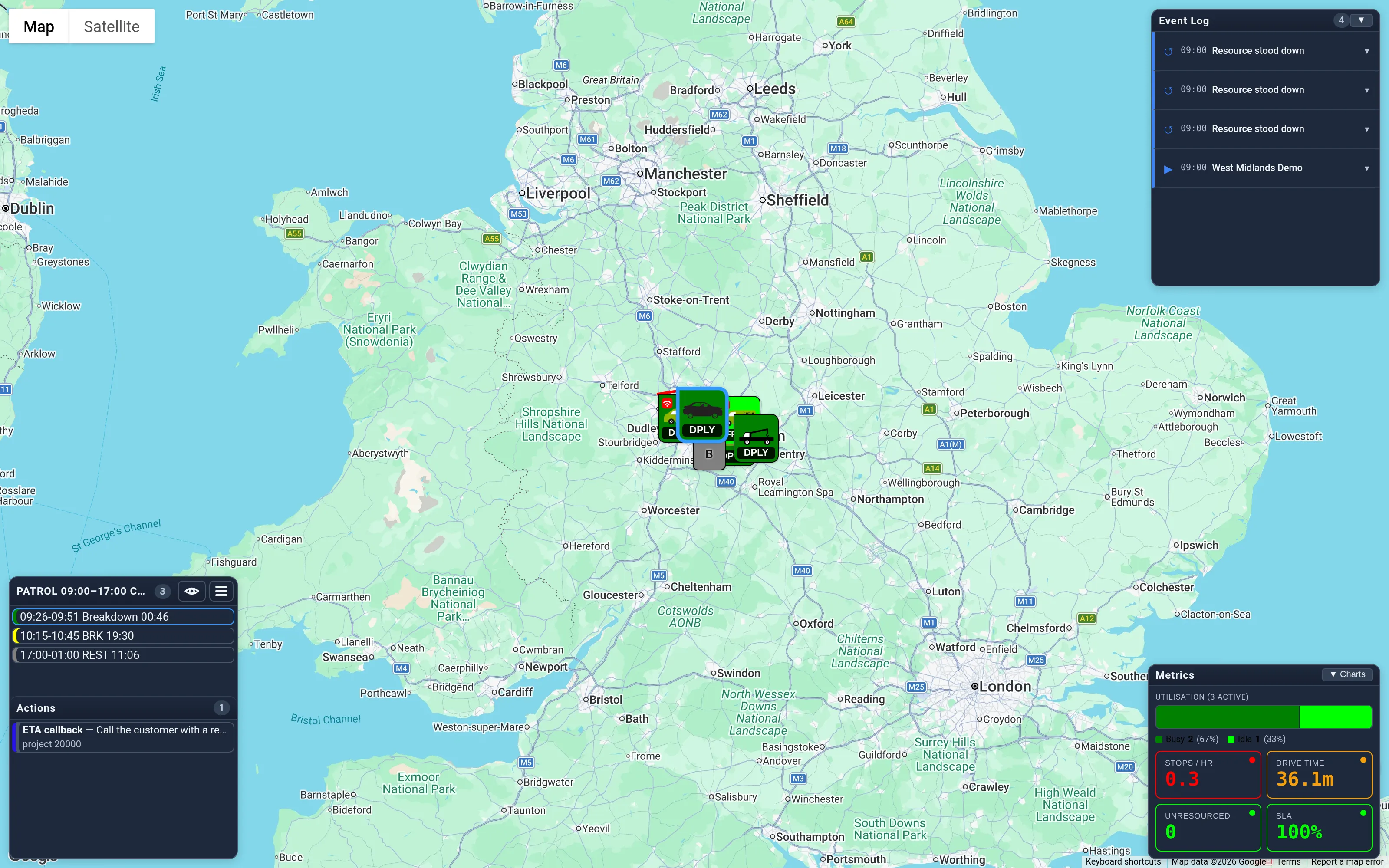
Working the queue is the most efficient way to operate. The overview — every list, every marker — is there when you need it, but it lacks focus: it shows everything, including the large majority of the operation that is running exactly as planned and needs nobody’s attention. The actions queue is the opposite: each entry is a step where a person adds value right now, ranked by how much it matters. Minimise the dispatch panel (the 👁 control in the top bar) and Helix reduces to exactly this — the queue, the plan you are working, and the map — so a controller works decision to decision instead of scanning for them.
- Click an action and Helix opens the relevant job — its resource, project or response point — in the editor, with the action shown at the top. You always process an action in the context of the root entity, so you can see the plan you are about to change.
- The action also appears whenever you open that editor yourself on a stop that has one pending — you do not have to come in through the queue to deal with it.
- Process it by choosing an outcome button — your decision is recorded, and lands in the owning record’s audit trail with the action’s text and outcome — or Defer it (snooze the stop’s actions for a while), or Acknowledge it when it is just a message. While you have an action open it is soft-locked, so it greys out on other controllers’ screens. The lock is a timer, not a claim: walk away without processing and it simply expires (about five minutes) — in the Contact Centre, closing the contact releases it immediately.
An automatic action’s rank doubles as its urgency (the queue temperature); an unranked definition sits at the middle of the scale. Manual messages author their own urgency in the messaging config.
Who sees which actions
Section titled “Who sees which actions”Two settings on each action decide who it reaches:
-
Class — a grouping, drawn from the domain’s catalogue, and the thing that makes an action automatic: the auto-raise engine only ever considers classed definitions. An action with no class is a manual message that anyone can service.
Class is also the skill gate — the second gate of targeting.
actioneeand desk scope decide WHERE the work is; class decides WHO among the pooled operators can handle it: each operator’s enabled classes (set in the Administration app, from the domain’s catalogue) filter the dispatch and Contact-Centre queues. An operator with no configuration sees every class, and a class-less action is serviceable by anyone — small teams need set nothing. The rule underneath: class gates pools; individuals are routed by identity — theresourceaudience (the engineer’s own inbox) ignores class entirely, because that work is already addressed to a person. The filter takes effect at the operator’s next sign-in. -
Actionee — the audience for the action:
Actionee Reaches anyeveryone ownerthe dispatch desk that owns the stop viewerany desk owning or watching the stop resourcethe resource fulfilling the stop — i.e. the Engineer view
Use owner for decisions that belong to whoever is managing the work (correcting the plan), and resource
for things the person doing the job should see.
Two kinds of action
Section titled “Two kinds of action”- Automatic (classed) — raised by the system from a rule. The backend evaluates the rule every time the plan changes and keeps one automatic action in progress per stop (the highest-ranked one whose rule currently fires). Classed actions are the ones you use to police the plan.
- Manual (no class) — raised by an operator from the editor. Everyone can see them; nothing is automatic.
Configuring actions
Section titled “Configuring actions”Actions are defined per stop type, in the domain file, under helix.actions on the stop’s parameters. Like
the rest of stopParams, they are inherited through clone, so a base type can carry an action that all
its descendants share. The available class names are listed once, globally, in helix.actionClasses.
// reference helix block — the catalogue of class names"helix": { "actionClasses": ["recovery", "resourceBehaviour", "tyres"]}// stopParams[type] — actions attached to one stop type"helix": { "actions": { "tyreSource": { "class": "tyres", // grouping — and what makes it automatic "actionee": "any", "rank": 20, "defer": 300, // a Defer outcome snoozes this stop's actions for 5 min "text": "sourceTyre()", // expression → message string, or null to not raise "outcome": ["success", "fail"] } }}The action definition
Section titled “The action definition”Every field is listed in the actionObject reference; the two worth understanding before you write one are:
textis the rule and the message at once. A value ending in()names a function in your client module, called as a method on the stop —thisis the stop, so the rule readsthis.arv,this.extand whatever else the plan exposes. Returning a string raises the action with that text; returningnulldoes not raise, and cancels an automatic action already showing. A value without()is literal text. An undefined function simply never raises, so a flag appears only once its rule exists.classis what makes an action automatic. Classed definitions are the only ones the auto-raise engine considers, and only the highestrankwhose rule currently fires is kept on a stop. Omit it for a manual message.
Two-way messaging
Section titled “Two-way messaging”messageIn and messageOut use the same action format (actionee, urgency, and a text gate) and live
in the stop defaults, so they’re configurable per stop type. Here text is reused as an enable gate:
true = always available, an expression = available per stop (e.g. only in certain states), and an absent
messageOut hides the facility entirely. messageOut is the dispatch → resource direction — the Message
resource button in the stop editor; messageIn is the resource → dispatch direction (the engineer view). By
default the resource’s NOW stop is messageable both ways (text: true, actionee resource/owner),
and the STBY roster stop carries a messageOut so a standby — above all a called — resource is
reachable from dispatch; other stops carry no messageOut, so the message panel stays hidden until you add
one. (The resource editor’s message button targets the resource’s head roster stop — NOW when on duty,
REST/STBY otherwise — and shows whenever that stop’s config carries a messageOut.)
State-gated actions — the standby callout
Section titled “State-gated actions — the standby callout”An action definition may carry state: "CALL" (or states: [...]): the action is then eligible only
while the stop is in that state, is cancelled automatically the moment the stop leaves it, and — once
an outcome is recorded — stays quiet for the rest of that visit, re-arming if the stop re-enters the state
later. Because the engine supplies both the gate and the suppression, a gated action needs only literal
text — no per-client rule function — so a domain can raise state-triggered checkpoints declaratively.
The standby callout is the worked example, and it is built in: when Spiral calls a standby resource out
(the head STBY roster stop goes to state CALL), core synthesises a state-gated action from the roster
block’s helix.callout
config — raised on call, offered to both the engineer’s inbox and the dispatcher’s queue
(actionee: "any"), refuse present only on a voluntary call, and closed with no extra machinery when the
call is accepted (the roster rewrite re-derives the stop) or stood down (the state leaves CALL). Choosing
accept performs the acceptance itself — the roster rewrite — from either seat.
Worked example: don’t send the wrong resource where cost to serve is high
Section titled “Worked example: don’t send the wrong resource where cost to serve is high”The goal is to flag a stop before it is committed when the plan would serve it with a resource that costs more than you are willing to pay — so a controller can reassign, or consciously accept it.
// stopParams for a high-value job type"helix": { "actions": { "costToServe": { "class": "resourceBehaviour", // groups it with the resource-economics checkpoints "actionee": "owner", // it is the owning desk's decision to correct "rank": 60, // outranks routine flags, so it wins the slot "defer": 600, "label": "Cost to serve", "icon": "Warning", "text": "highCostToServe()", // your clientModule rule — below "outcome": ["reassign", "accept", "escalate"] } }}// crudClientModule — the client's backend domain functions, loaded at runtime. `this` is the stop being// scheduled, so the rule reads whatever the plan exposes on it (the planned resource and its modelled cost// are domain-specific fields).highCostToServe() { const planned = this.plannedServeCost; // what the current plan will cost to serve this stop const target = this.targetServeCost; // the most you are willing to pay for it if (planned == null || target == null) return null; // can't judge → don't raise const over = planned - target; if (over <= 0) return null; // within target → no flag return `£${Math.round(over)} over target — review the planned resource`;}What happens:
- Each time Spiral re-plans, Helix evaluates
highCostToServe()against the stop. While the planned cost is within target it returnsnulland nothing shows. The moment the plan would overspend, it returns the message and the Cost to serve action is raised on the owning desk. - Because it is ranked
60, it takes the stop’s automatic slot ahead of lower-ranked flags (a routinewrongSkillwarning at rank20, say). One stop never nags with two automatic actions at once. - The controller clicks it, lands in the job with the plan in front of them, and chooses an outcome — reassign (and correct the plan), accept (record that the spend is justified), or escalate.
- The outcome is recorded on the stop and audited, which suppresses the flag from coming straight back for the same situation. If they instead Defer, the stop’s actions go quiet for ten minutes while they sort it out off-system.
Tune the threshold in the rule, not the UI — the same pattern covers “resource too far”, “premium vehicle on
routine work”, or “holding a resource back”: each is a clientModule function that returns a message when the
plan crosses your line, and null when it doesn’t.
What gets recorded
Section titled “What gets recorded”Processing an action writes its outcome to the stop (stop.actions.<name>) and into the audit trail, then
deletes the action record itself — the stop’s record and the audit are the durable trace; the queue
entry is not. (Mechanically the chosen outcome travels as a force of the record’s ext.outcome, then the
delete follows — the shape an external system uses to conclude an action programmatically.) A Defer
outcome instead timestamps the stop so its actions stay paused until the deferral passes. Either way the
plan continues to optimise underneath — actions sit alongside it, they don’t freeze it.
An action can conclude four ways, and only the first needs a person:
- An outcome is chosen — by an operator, the engineer, or an external reply through a notification channel; all three converge on the same record-and-delete.
- Deferred — hidden until the deferral passes (see the caution below).
- Cancelled — the rule stops firing, its state gate closes, the stop goes away, or the definition itself vanishes in a domain reconfiguration; the flag simply retires, nothing is recorded.
- Concluded by a step — the callout’s answer window is the built-in example: if nobody answers in
time, a step concludes the action as an automated refusal, recorded exactly as if a person had chosen
it (the outcome says
timeout).
Extending this for another process
Section titled “Extending this for another process”Most new checkpoints need no code. Give the class a name in the catalogue, then declare the action on the stop type it belongs to — a state gate and literal text are usually the whole job:
"actions": { "remoteFix": { "class": "technical", "actionee": "owner", "rank": 40, "state": "REBK", "label": "Check for remote fix", "text": "Before rebooking, check the fault detail — this may be fixable remotely.", "outcome": ["fixedRemotely", "visitNeeded"] }}Reach for a text function only when the trigger depends on something a state cannot express — “the plan
has put an expensive resource on a cheap job”, “this resource is idle while voluntary work is waiting”.
The function returns the message when your condition holds and null when it does not, and it is
responsible for staying quiet once an outcome has been recorded.
Two questions settle the design:
- Does a person need to judge it? If yes, it is an action. If the system already knows what to do, it is a step — automated, fired by an event, with nobody watching.
- Which desk carries it?
actioneedecides:ownerfor the desk accountable for the work,viewerfor anyone watching it,resourceto send it to the engineer in the field,anyfor both seats.
Actions and steps
Section titled “Actions and steps”Actions ask a person; steps act by themselves — events are the timing machinery that fires them. The two kinds work together inside a process: when a notification step exhausts its delivery retries, it gives up and raises an action, so a dead channel is never silent. If you are trying to make something happen automatically on a state change — telling a customer their job is done, for instance — that is a step, not an action.
Related
Section titled “Related”- Events — timed and triggered change, and the state-change hooks
- actionObject — the full field reference
- Notifications & Integration — channels, retries and replies